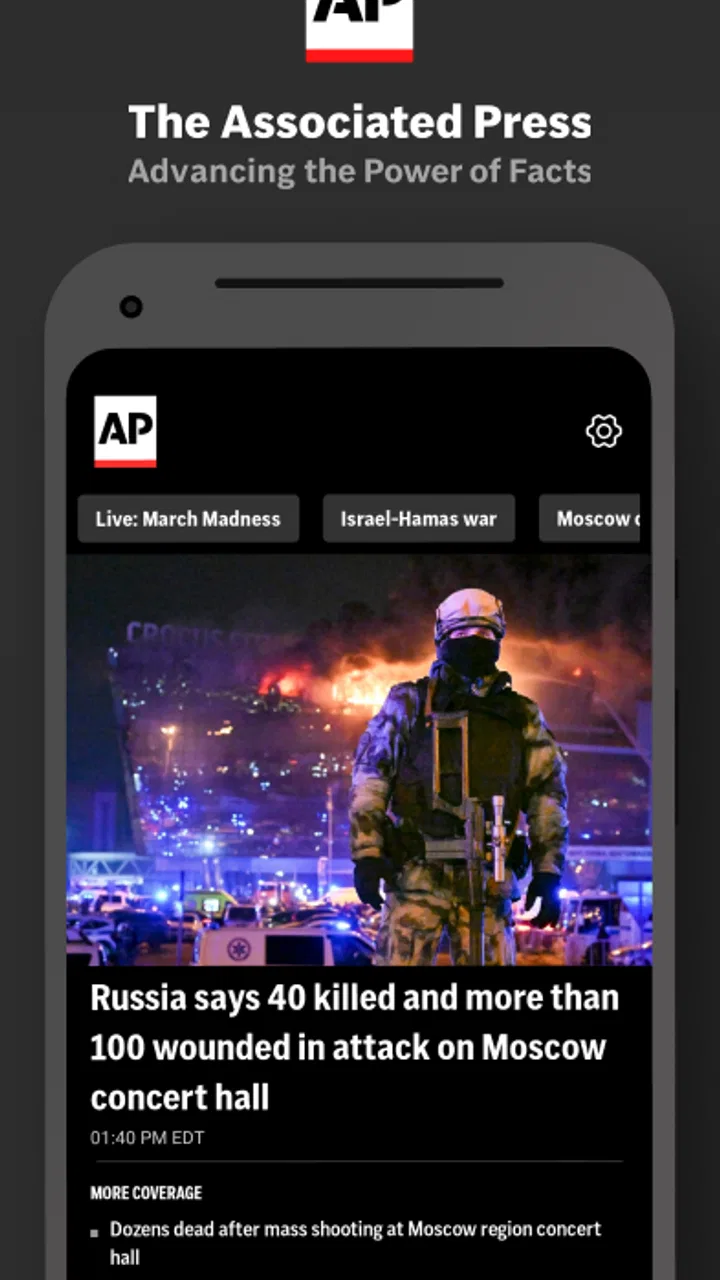
AP News: World & Local
- 4.3
- Rating
- 1.00M
- Installs
- Free
- Price

 Analysis by App-foxy
When I want a straightforward way to catch up on major events without committing to one newspaper’s editorial voice, I turn to AP News. It is a free news and magazines app from The Associated Press, built around world and local reporting rather than entertainment or social conversation. My first impression is that it works best as a dependable starting point: I can open it, scan the latest headlines, and decide which stories deserve more of my time.
The app is aimed at a broad audience, with an Everyone 10+ content rating, and it runs on Android 9 or later. Its current version is 6.19 PROD. That makes it a practical choice for many existing phones, especially if you want a dedicated news reader instead of relying entirely on a browser or a general-purpose feed. It is not trying to replace every source of information in your life, but it can make the daily habit of checking the news more focused.
What to expect from the AP News experience
The main value here is concentration. Rather than opening a browser and sorting through search results, I get a news-focused space where the important stories are presented together. The subject range is broad enough for someone who wants international developments, national coverage, and local news in the same app. That mix is useful because major events often affect everyday decisions, while local reporting is easy to overlook when I only follow large headlines.
You May Also Like

 Blood Strike: 2.5 Anniversary
Blood Strike’s Loadouts Turn Every Drop Into a Tactical Gamble
A close look at Blood Strike’s custom loadouts: how fast access to signature weapons reshapes its battle royale rhythm, rewards preparation, and narrows the gap between fights.

 Pandora - Music & Podcasts
Pandora’s Music Is Easy to Start, but Harder to Recover
Pandora’s strength is its low-effort path from a seed to a station. Its weak spot is how much confidence it asks you to place in connection, setup, and quiet recovery.

 8 Ball Pool
 Is Built on Rivalries, Rematches, and Routine
A close look at the rivalries, rematches, shared routines, and unanswered safety questions that turn a quick pool match into a persistent mobile community.

 Samsung Music
’s Quiet Strength Is Playing What You Already Own
Its reach comes less from spectacle than from dependable access to a personal library. That simplicity is both the app’s strongest retention engine and its ceiling.

 AccuWeather: Weather Radar
AccuWeather Review: A Quick, Clear Forecast for Everyday Decisions
For everyday plans, the best forecast is the one you can understand quickly. AccuWeather makes rain timing, radar, and local conditions easy to act on, with a few trade-offs.

 Hill Climb Racing
Why Hill Climb Racing Still Turns Crashes Into One More Run
A tiny car, a bumpy hill and one more upgrade: Hill Climb Racing keeps resurfacing because its simple chaos makes every near-miss feel personal.
More From Our News Desk



I would describe the tone as practical and report-centered. The app is not designed around endless opinion threads, personal posts, or a stream of viral clips. That makes it easier for me to read a story for its basic facts before deciding whether I want additional commentary elsewhere. At the same time, readers who mainly want analysis, a highly customized topic dashboard, or a newspaper-style package may find the experience less tailored than their preferred alternative.
The scale of the service is reassuring without being the only reason to try it. AP News has a 4.2 average from around 146 thousand ratings and more than a million installs. I read those figures as evidence that it has become a familiar option for people who want news on a phone, not as a guarantee that every part of the interface will suit every reader. My own recommendation depends more on how you consume news than on popularity.
One useful distinction is between checking and studying. For a quick morning scan, the app makes sense: I can see what has changed and open the stories that matter to me. For deep research, I would still compare several sources, revisit older coverage, and look for specialist reporting. A short news app session should be the beginning of understanding, not a substitute for it.
Who will get the most from it
I think AP News is a strong fit for a first-time news-app user who wants a recognizable source and does not want to build a complicated reading system. It also suits people who move between cities or regions and want world coverage alongside local awareness. If you prefer to check headlines during a commute, lunch break, or quiet moment before bed, its focused purpose is more convenient than opening several unrelated apps.
It is less suitable for someone who wants every article gathered from many publishers in one personalized stream. Aggregators can offer more variety, while a local newspaper app may provide deeper neighborhood reporting. Likewise, readers who want a strong opinion section, extensive financial tools, or a magazine-like reading experience should look at services designed specifically for those needs. AP News is most convincing when you value a broad reporting window and a clean route to individual stories.
Starting with the app without getting lost
After installing it, I recommend resisting the urge to read everything immediately. Begin with a simple purpose: decide whether you want a quick overview of the day, local awareness, or a way to follow a developing subject. That small decision changes how useful the app feels. Without it, even a well-organized news product can become a stream of headlines that I glance at but never turn into understanding.
The first useful session is short. I open the main news view, scan the headlines, and choose one story that affects my interests directly. I then read beyond the headline before moving on. This sounds obvious, but it is an important habit because headlines are designed for quick recognition, while the article provides the context needed to judge what actually happened.
If you are installing AP News because you have just heard about a major event, use that event as your first test. Search through the available coverage or browse the current news areas until you find the relevant report, then compare the headline with the article’s details. This gives you a meaningful result quickly: you learn how easy it is to locate a subject, how comfortable the text is to read, and whether the app’s presentation works for you.
I also suggest setting a personal stopping point. News apps can encourage repeated checking, especially when a story is developing. A useful routine is to read a small selection, note what needs follow-up, and close the app. That approach keeps the service informative rather than allowing it to become a background source of anxiety. The app can support a news habit, but the quality of that habit still depends on how deliberately I use it.
Your first successful action
The first real success is not simply opening the app; it is finding one relevant story and understanding why it matters. For example, imagine I am leaving home and want to know whether a local issue has changed since yesterday. I can scan the local coverage, open the most relevant report, read the key details, and then check broader headlines for the international or national context. In a few minutes, I have a clearer picture instead of a collection of disconnected alerts.
Another practical workflow is to use the app at two different times of day. In the morning, I use it for orientation: what subjects deserve attention? Later, I return only if one of those subjects has a direct effect on my plans. This two-stage approach prevents me from treating every headline as equally urgent. It also helps reveal whether AP News fits my routine better than a social feed, where the order of stories may be driven by engagement rather than my priorities.
When a story is complicated, I try to separate three things while reading: what is confirmed in the report, what is still developing, and what I personally want to know next. That habit is especially valuable with breaking news. The app can help me reach the initial reporting quickly, but I should not mistake an early report for the final account of an event. Returning later may be worthwhile when the situation is changing.
For local readers, the best test is to look for coverage that has practical relevance rather than only searching for dramatic headlines. A report about a nearby decision, public issue, or regional event may be more useful to daily life than the biggest international story. This is where the combination of world and local news becomes meaningful: I can keep perspective without losing touch with what is happening close to home.
Common points of confusion
One possible confusion is expecting the app to behave like a social network. It does not need my participation to be useful. I am not opening it to build a public profile or debate every headline. I am opening it to read reporting. If I approach it as a conversation platform, I may judge it by features that are not central to its purpose.
Another is assuming that a headline scan is enough. I have found that the most useful information often appears after the first sentence: the background, the people affected, and the explanation of what happens next. My tip is to open fewer stories and read them more carefully. That gives the app a better chance to improve my understanding instead of merely increasing the number of headlines I have seen.
Readers may also wonder whether a single news source is sufficient. In my view, it is a sensible first stop but not a complete information diet. For a major political, scientific, or international subject, I would consult additional reporting and, where appropriate, specialist sources. AP News can help me identify the event and establish a factual starting point; comparison is still valuable when the stakes are high or the subject is technical.
There is also a difference between local availability and local depth. Seeing local news in the same product as world coverage is convenient, but I would not automatically replace a dedicated community publication if neighborhood detail is my main priority. Someone who needs very specific local announcements, extensive municipal reporting, or a tightly regional perspective may prefer a local outlet alongside this app rather than using it alone.
Finally, free does not mean frictionless for every reader. The price is free, which removes the main barrier to trying it, but the real cost can be attention. If I check constantly, the app may take more time than it saves. I get the best results when I use it with a purpose, read the reports that matter, and leave once I have enough information for the moment.
How it compares with familiar alternatives
Compared with reading news in a mobile browser, AP News feels more intentional. A browser is flexible and excellent for searching across many publishers, but it also brings search clutter, unrelated recommendations, and the temptation to jump between tabs. The dedicated app gives me a clearer starting point. The trade-off is that a browser remains better when I already know the exact source or want to compare many outlets side by side.
Compared with a social-media feed, the difference is even more important. Social platforms can surface breaking information quickly, but the surrounding posts may mix reporting, reaction, speculation, and repetition. AP News gives me a more direct path to news articles. I still need judgment, especially during fast-moving events, but I am beginning from a more focused reading environment rather than from a stream shaped by public reaction.
News aggregators are stronger when variety and personalization are the priority. They can collect stories from a wide range of publishers and let me compare framing quickly. AP News is more appealing when I would rather begin with one established reporting organization and avoid managing a crowded list of sources. Neither approach is universally better: aggregation offers breadth, while a focused app offers simplicity and a more consistent starting point.
A subscription newspaper app may provide deeper archives, specialized sections, and a more distinctive editorial package. If I read one publication every day and want its investigations, columns, and subscriber features, that type of service may be a better investment. AP News is the more approachable choice when I want a free general news companion without committing to one publication’s entire ecosystem.
Small habits that make the app more useful
I get more from the app when I treat headlines as a map rather than a checklist. I look for one story from close to home, one broader event, and one subject that I genuinely want to understand. This gives me variety without encouraging a frantic scroll. It also makes the app useful for both practical awareness and general knowledge.
For developing events, I make a mental note of the article’s time and situation before sharing or discussing it. News can change quickly, and a report that was accurate when written may not describe the latest position later in the day. The app is helpful for reaching current coverage, but responsible use means checking the newest available report before drawing a firm conclusion.
I also avoid judging the whole service from one unusually slow or uninteresting news cycle. A news app’s value changes with my needs. On a quiet day, it may simply confirm that nothing urgent requires my attention. On a busy day, it can help me identify the stories worth following. That is a quieter benefit than constant novelty, but it is one I appreciate.
The app’s broad audience is another advantage for shared households. A family member interested in international news and another who mainly wants local awareness can both start from the same place. It may not satisfy either person as deeply as a specialized source, but it reduces the need to maintain several separate news routines. For casual readers, that simplicity can matter more than a long list of advanced options.
My recommendation after using it
AP News is a sensible first installation for anyone who wants a free, focused way to follow world and local news. The Associated Press name gives the app a clear reporting identity, while the broad coverage makes it useful beyond a single subject. I like it most as a daily orientation tool: open it, find the stories relevant to my life, read with enough attention to understand them, and then move on.
Its limitations are also clear. It is not the ideal replacement for a specialist publication, a deep local outlet, a multi-source aggregator, or a service built around long-form analysis. People who want heavy personalization or constant commentary may find it restrained. I would also avoid using any single app as my only source when a subject is important, technical, or rapidly changing.
Still, the low-risk starting point matters. It is free, rated for Everyone 10+, and compatible with Android 9 and newer devices. The app has a 4.2 average across around 146 thousand ratings, and its reach extends beyond a million installs. Those details make it easy to try, but my stronger reason for recommending it is practical: it gives a first-time reader a clear path from opening the app to finding one meaningful story.
My best advice is to use AP News deliberately, not endlessly. Choose a short reading window, begin with the local or world topic that matters most to you, open the full report, and use other sources when the subject deserves comparison. If that routine feels natural, this app can become a reliable part of your day. If you need a highly specialized or deeply personalized news system, it is better viewed as a useful companion than as your only destination.
FAQs for AP News: World & Local
01What are the main features of the AP News: World & Local app?
AP News: World & Local offers a comprehensive news experience, providing users with up-to-date coverage on global and local events. Key features include personalized newsfeeds, real-time notifications, and multimedia content such as videos and photos. Users can also access in-depth articles and analyses from trusted AP journalists.
02Is the AP News app free to use, or are there any subscription costs?
The AP News app is free to download and use. It provides access to a wide range of news articles, videos, and photos without any subscription fees. However, some features or content may be limited to premium users, so checking the app’s in-app purchase options is recommended.
03How does the AP News app ensure the credibility of its news content?
AP News is renowned for its commitment to journalistic integrity and accuracy. The app sources content directly from the Associated Press, a globally respected news organization with a long history of unbiased reporting. AP journalists adhere to strict ethical standards, ensuring reliable and trustworthy news coverage.
04Can I customize the types of news I receive on the AP News app?
Yes, the AP News app allows users to personalize their news experience. You can select your favorite topics, such as politics, sports, or technology, to tailor your newsfeed according to your interests. Additionally, you can set up notifications to stay informed about breaking news or updates in specific areas.
05Does the AP News app work offline, and how can I save articles for later reading?
While the AP News app primarily requires an internet connection to access the latest updates, you can save articles for offline reading. This feature is handy for users who wish to read during commutes or in areas with limited connectivity. Simply bookmark or save the articles while online to access them later.
Pros
- User-friendly interface for easy navigation.
- Customizable news alerts and notifications.
- Wide range of local and global news coverage.
- Offline reading mode for convenience.
- Minimal ads ensure a clean reading experience.
Cons
- Limited multimedia content like videos.
- Occasional lag in loading articles.
- No in-app commenting feature available.
- Requires account for personalized features.
- Limited language support beyond English.

AP News: World & Local
Gallery